Daddy to Be Card – SVG Cutting File: Crafting Tips for a Flawless Finish
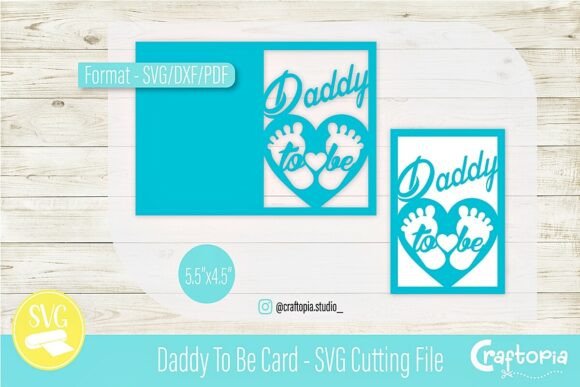
Celebrating the transition into fatherhood requires a gesture that feels as significant as the milestone itself. The Daddy to Be Card – SVG cutting file offers a heartfelt way to mark this occasion, featuring elegant lettering integrated with a heart-shaped motif containing baby footprints and a small heart. This design is more than just a digital asset; it is a structured template sized at 5.5 x 4.5 inches, specifically engineered for expectant dads, baby showers, and pregnancy announcements. However, owning the file is only the first step. Achieving a professional, keepsake-quality result depends entirely on how you prepare, cut, and assemble the design. Many crafters overlook technical nuances in favor of excitement, leading to wasted materials and frustration. By understanding the specific requirements of this vector design, you can avoid common pitfalls and create a card that truly honors the journey ahead.
Understanding File Compatibility and Software Limitations
A frequent mistake occurs before the cutting machine even powers on. Users often assume that any file labeled "SVG" will work seamlessly across all platforms. While this Daddy to Be Card – SVG cutting file includes SVG, DXF, and PDF formats, selecting the wrong one for your specific software can compromise the design's integrity. For Cricut Design Space users, the SVG format is generally ideal because it preserves layers and colors. However, Silhouette Studio Basic Edition users cannot open SVG files without an upgrade; they must use the DXF version. Attempting to force an incompatible file type often results in ungrouped elements, lost sizing, or jagged edges that ruin the delicate footprint details.
Furthermore, relying solely on the PDF format for cutting is a critical error. PDFs are excellent for printing or tracing but lack the vector path data required for precision die-cutting. If you attempt to trace a PDF within your cutting software to create a cut line, the resulting path will likely be imperfect, especially around the intricate curves of the heart motif. Always verify which format your machine natively supports before importing. Taking thirty seconds to confirm compatibility prevents hours of troubleshooting and ensures the clean cut lines promised by the designer remain intact.
Material Selection and Intricate Cut Settings
The heart-shaped motif containing baby footprints introduces a level of intricacy that demands respect. A common oversight is treating this design like a standard block-letter project. Standard cardstock (65lb to 80lb) works well for the base, but if you are layering the footprint detail, using paper that is too thick or fibrous can cause tearing. When the blade drags through heavy material on small interior cuts, it often rips the paper rather than slicing it cleanly. This destroys the sentimental value of the tiny footprints, making them look messy rather than precious.
To avoid this, adjust your machine settings specifically for intricate cuts. Do not rely on the default "Cardstock" setting. Instead, utilize an "Intricate Cut" or "Fine Detail" preset, or manually increase the pressure slightly while reducing the speed. Slowing down the blade allows it to navigate tight corners without dragging. Additionally, ensure your cutting mat has adequate stickiness. If the paper shifts even a fraction of a millimeter during the cut, the registration marks for the heart motif will misalign. Using a light-grip mat for thinner papers or refreshing the adhesive on a standard grip mat can make the difference between a ruined project and a crisp, professional finish.
Sizing Errors and Aspect Ratio Distortion
This template is designed at a precise 5.5 x 4.5-inch dimension. This aspect ratio is intentional, ensuring the lettering and footprint motif sit in perfect visual balance. A significant error arises when users resize the design without locking the aspect ratio. Stretching the width to fit a different envelope size often distorts the heart shape, making it look oval or squashed. Similarly, expanding the height can elongate the typography, rendering the elegant script difficult to read or aesthetically disjointed from the graphics.
If you need a different size, always lock the aspect ratio icon in your software before adjusting dimensions. Better yet, consider whether resizing is truly necessary. The 5.5 x 4.5 size corresponds to standard A7 envelopes, which are widely available and provide ample space for a personal message inside. If you must resize significantly, test the new dimensions on scrap paper first. Scaling down below 4 inches may render the baby footprints too small to cut reliably, while scaling up excessively might thin out the stroke weight of the lettering, causing structural weakness during assembly. Respecting the original proportions preserves the designer’s intended emotional impact.
Assembly Planning and Layer Management
Digital previews can be deceptive. Seeing the completed design on screen does not always translate to intuitive physical assembly. Crafters sometimes cut all pieces without planning the order of adhesion, leading to glue seepage on visible surfaces or misaligned layers. With a design featuring integrated motifs, the layering sequence matters. Typically, you should adhere the largest background elements first, followed by the heart outline, and finally the delicate footprint details. Applying glue directly to tiny footprint pieces is nearly impossible without creating a mess. Instead, apply adhesive to the back of the heart layer or use double-sided tape sheets for a cleaner bond.
Another practical tip involves weeding. Before removing the cut pieces from the mat, weed away the negative space carefully. Leaving excess material attached can obscure alignment guides. Use a fine-point weeding tool to lift interior cuts from the footprints gently. Rushing this step can bend or crease the positive pieces you intend to keep. Patience during the weeding phase ensures that when you do assemble the card, every element sits flush and secure, creating a tactile experience that matches the visual elegance.
Evaluating Quality Before Purchase and Use
Before downloading or purchasing any digital cutting file, including this Daddy to Be Card – SVG cutting file, evaluate the source critically. Not all files marketed as "cutting ready" are optimized for machines. Check product descriptions for explicit mentions of node count and testing. A high-quality file will have smooth bezier curves and minimal nodes, whereas poor conversions often appear jagged or pixelated when zoomed in. Since this design includes specific dimensions and multiple formats, it indicates a higher standard of preparation, but verifying reviews or sample images from other makers provides additional confidence.
Also, consider the end recipient. While this design is universally touching, ensure the style aligns with the expectant father’s taste. The elegant lettering and footprint motif lean toward classic and sentimental. If the dad-to-be prefers minimalist or humorous aesthetics, this specific design might not resonate as deeply. Matching the design tone to the recipient ensures the effort you put into avoiding technical mistakes translates into genuine emotional satisfaction. Crafting is ultimately about communication; technical perfection serves that goal, but empathy dictates the choice.
Sharing Your Success Responsibly
Once you have navigated these considerations and created a beautiful card, sharing your work helps build community and supports designers. When posting photos of your finished project, tag craftopia.studio_ to share your creations. This simple act connects you with other crafters who may offer tips or inspiration for future projects. More importantly, it validates the utility of the file for others searching for reliable resources. By approaching the Daddy to Be Card – SVG cutting file with technical mindfulness and creative intention, you transform a digital download into a lasting tribute to new fatherhood.